


Market Updates
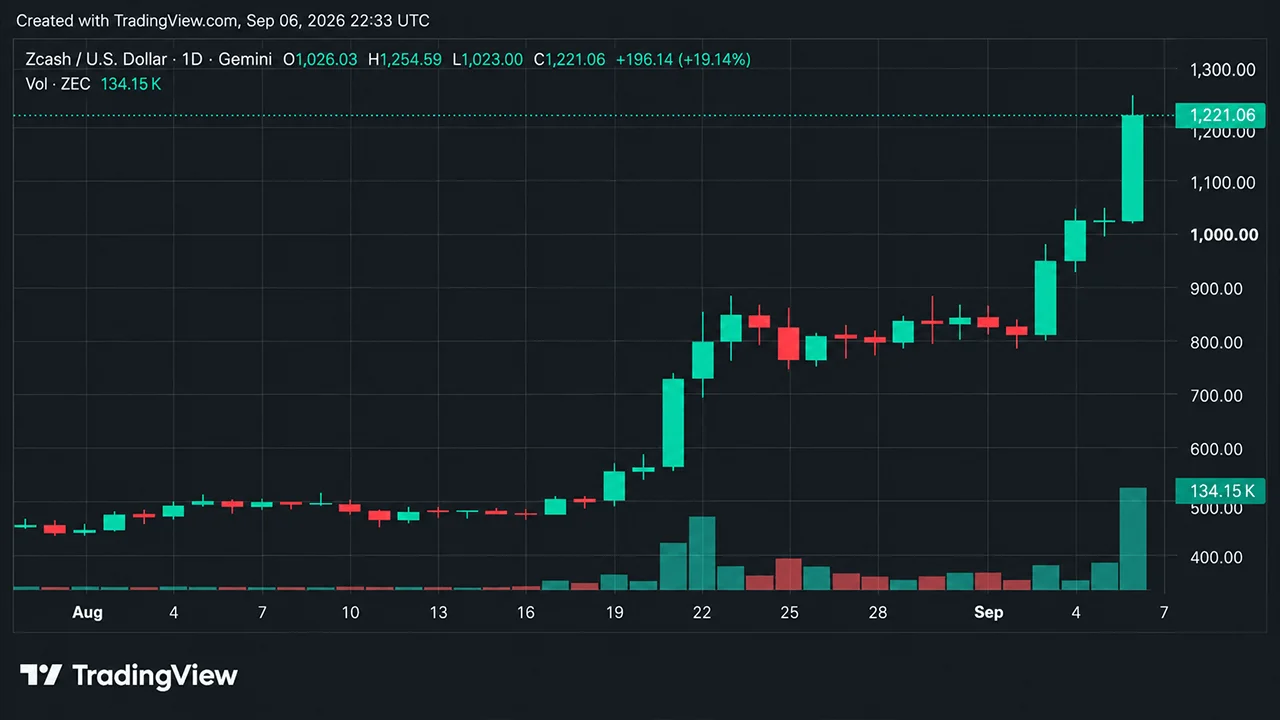
Weekly Crypto Recap: Bitcoin Rises as ZEC Deliver Strong Gains
Crypto cap held above $2.7T following a 2% weekly rise. See how Zcash, BNB, and major altcoins performed in the first week of September.

Buy BTC with a debit card, credit card or bank transfer and have it delivered straight to a wallet you control. From $30, with the fees and amount you'll receive shown before you confirm.
Popular cryptocurrencies to buy
Choose an amount, payment method and wallet, then review your quote before you buy.


1. Enter how much BTC you want to buy
Choose your currency and enter an amount in the buy widget. You'll see an estimate of how much BTC you'll receive.

2. Continue with your preferred payment method
Choose from the payment options available to you, which may include debit card, credit card or bank transfer.
.svg?v=1785350642344)
3. Complete any required verification
The payment provider may ask you to verify your identity before processing your purchase.

4. Review and confirm your order
Check the exchange rate, fees and amount of BTC you'll receive before approving your purchase.

5. Receive your BTC
Once the payment is processed, your BTC is sent to the wallet you selected.
Buy BTC and keep control of it, in a wallet only you can access.
Choose a wallet you control as the destination and receive your BTC there after the purchase is processed.
Debit card, credit card or bank transfer, depending on what is available where you are.
Your payment is processed by the payment provider shown during checkout. Review the provider, payment method and final quote before confirming.
Manage your BTC after the purchase: move it, spend it, swap it for other assets, or sell it back to fiat.
Hold BTC alongside ETH, BCH and other leading cryptocurrencies and networks in a single app.
Use the Bitcoin.com Wallet app on mobile, or a Bitcoin.com account to reach your crypto from any device.
Key numbers to understand before you buy BTC.
Bitcoin's issuance rules cap the total supply at 21 million BTC. No more than that can ever be created.
You don't need to buy 1 BTC. Bitcoin can be divided into 100 million smaller units called satoshis.
Once the BTC is in a wallet you control, it's yours to hold or use.

Keep BTC in a wallet you control, secured by a recovery phrase only you hold.

Move BTC to any Bitcoin address at any time, without asking a provider for permission.

Pay merchants and services that accept Bitcoin, directly from a wallet you control.

When sending BTC from a self-custody wallet, the fee rate you choose can affect how quickly miners are likely to include the transaction when the network is busy.

Exchange BTC for other supported cryptocurrencies without going back through a bank.

Convert BTC back into your local currency when you choose to, from the same wallet or account.
Join Bitcoin.com and discover how simple it can be to own, manage, and grow your Bitcoin.
Crypto cap held above $2.7T following a 2% weekly rise. See how Zcash, BNB, and major altcoins performed in the first week of September.
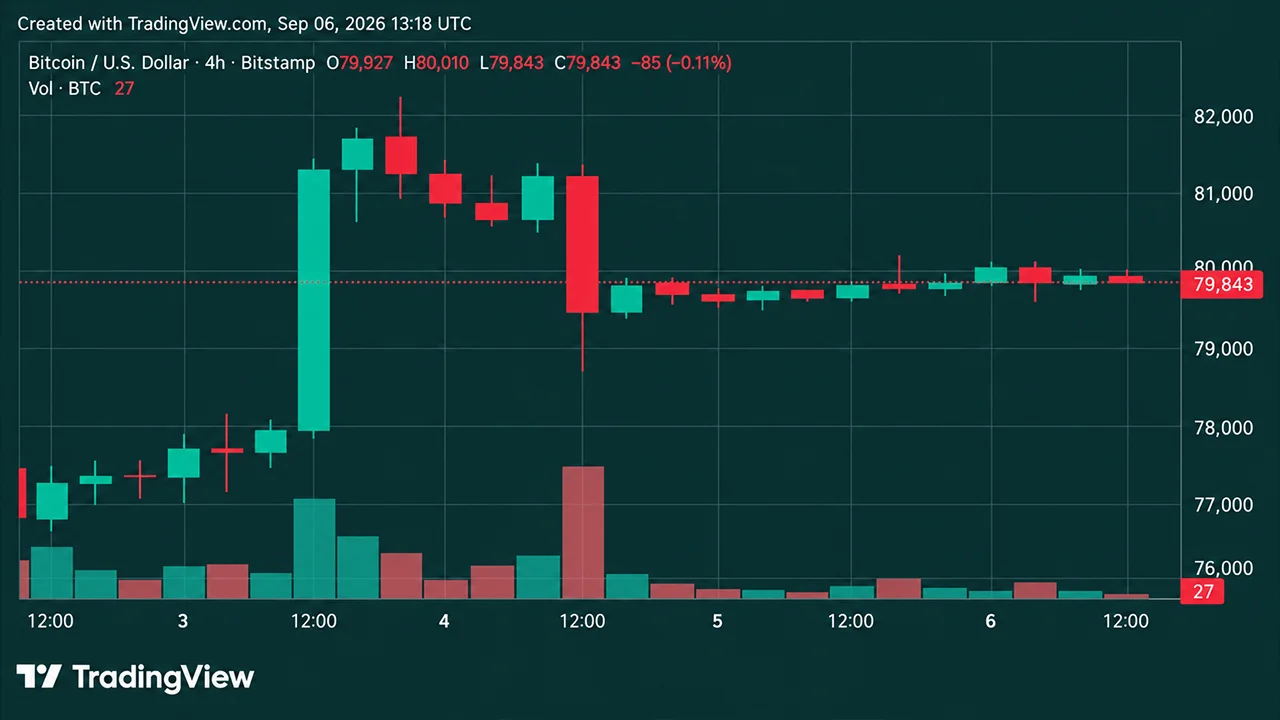
Bitcoin price holds near $80,000 as momentum cools, volume thins and bulls battle resistance before another breakout.
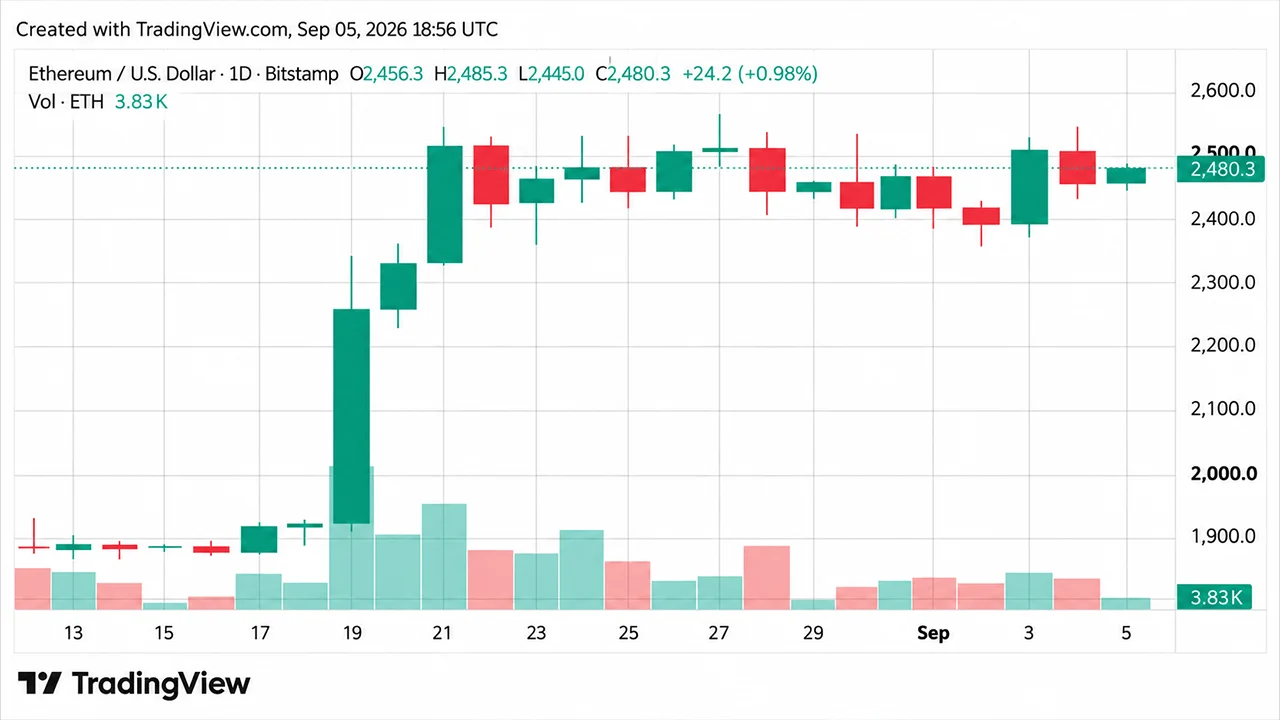
Ethereum price holds near $2,500 as ETH bulls eye $2,550, while momentum cools and September optimism stays alive.
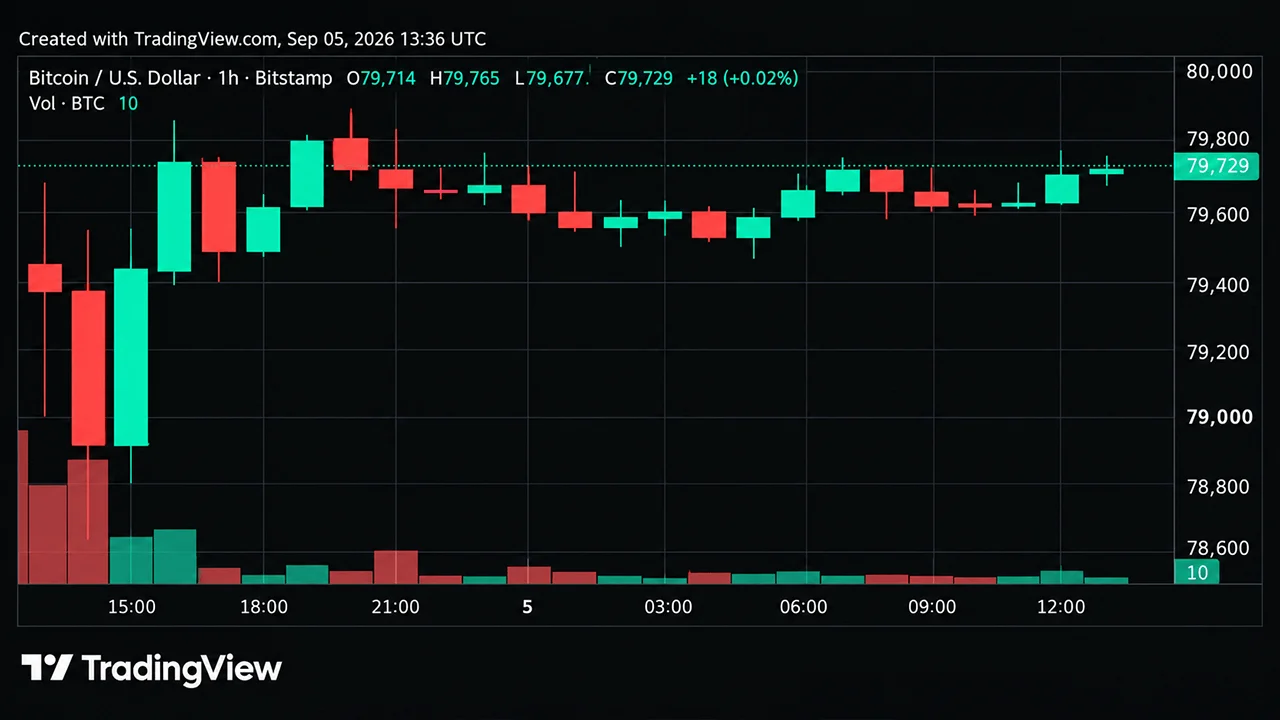
Bitcoin's price trades near $79,700 per coin as bulls defend $78,500 and fight to reclaim $80,000, with $82,281 still in play.
Buying Bitcoin online comes down to how you pay, where you buy, and where the BTC goes afterwards. The table below covers the payment routes; for a fuller comparison of buying methods across crypto generally, see the guide to buying crypto. What follows covers the parts specific to Bitcoin.
| Payment method | Speed | Relative cost | ID usually required | Where your BTC lands |
|---|---|---|---|---|
| Debit or credit card | Usually instant | Higher | Yes | Wallet or account |
| Bank transfer | 1 to 3 days | Lowest |
Bitcoin transactions are settled by the network rather than by whoever sold you the coins. That affects both what a transfer costs and when the BTC becomes usable.
A network fee is attached to each transaction and goes to the miners who include it in a block. The fee is based on the size of the transaction in data terms rather than on the amount of BTC being sent, so moving a large amount does not automatically cost more than moving a small one. Fees rise when more transactions are competing for space in a block.
When sending BTC from a self-custody wallet, the fee rate you choose can affect how quickly miners are likely to include the transaction when the network is busy.
A Bitcoin transaction is confirmed when it is included in a block, and each block added afterwards counts as a further confirmation. Wallets and services differ in how many confirmations they wait for before treating a balance as settled, which is one reason delivery times vary between providers.
Bitcoin addresses have their own formats, and a confirmed transaction generally cannot be reversed by the sender. Check the destination before confirming, and make sure it is a Bitcoin address rather than one belonging to another asset or network.
When BTC is delivered to a self-custody Bitcoin wallet, you control the keys and can send or spend it once the transaction has confirmed. If you buy through a custodial exchange or app instead, the provider controls the BTC until you withdraw it to a Bitcoin address you control. Self-custody puts backup and key management on you, while custodial holding makes you dependent on the provider.
Beyond the processing fee shown at checkout, the cost of buying BTC includes the spread built into the quoted rate and the Bitcoin network fee when the coins are delivered or later moved. If you buy on an exchange and withdraw afterwards, a withdrawal fee may apply as well. The final amount of BTC you receive is the most useful comparison, because it reflects the quoted rate and the costs included in the purchase.
The buy flow on this page is one route. Others differ in custody, cost and verification.
Bitcoin ATMs let you buy with cash or a card. You scan a Bitcoin address from your wallet so the machine knows where to send the coins, and the BTC arrives after you pay. They go directly to a wallet you control. ATM fees can be higher than other buying routes, so check the rate and total cost before confirming, and note that verification requirements vary by operator and amount.
These work for Bitcoin as they do for any asset: a Bitcoin exchange holds the BTC until you withdraw it, and a peer-to-peer marketplace matches you with a seller, often using escrow. Both routes, and the risks that come with them, are covered in the guide to buying crypto. If you withdraw BTC from an exchange, check the address and expect a withdrawal fee.
| Wallet or account |
| Apple Pay or Google Pay | Usually instant | Higher | Yes | Wallet or account |
| Cash at a Bitcoin ATM | Minutes | Varies by operator | Sometimes | Your wallet, via a scanned address |
| Peer-to-peer | Varies | Varies | Sometimes | Escrow, then your wallet |