Bitcoin Price Slips Below $84K as 20-Minute Flush Erases $400M in Longs
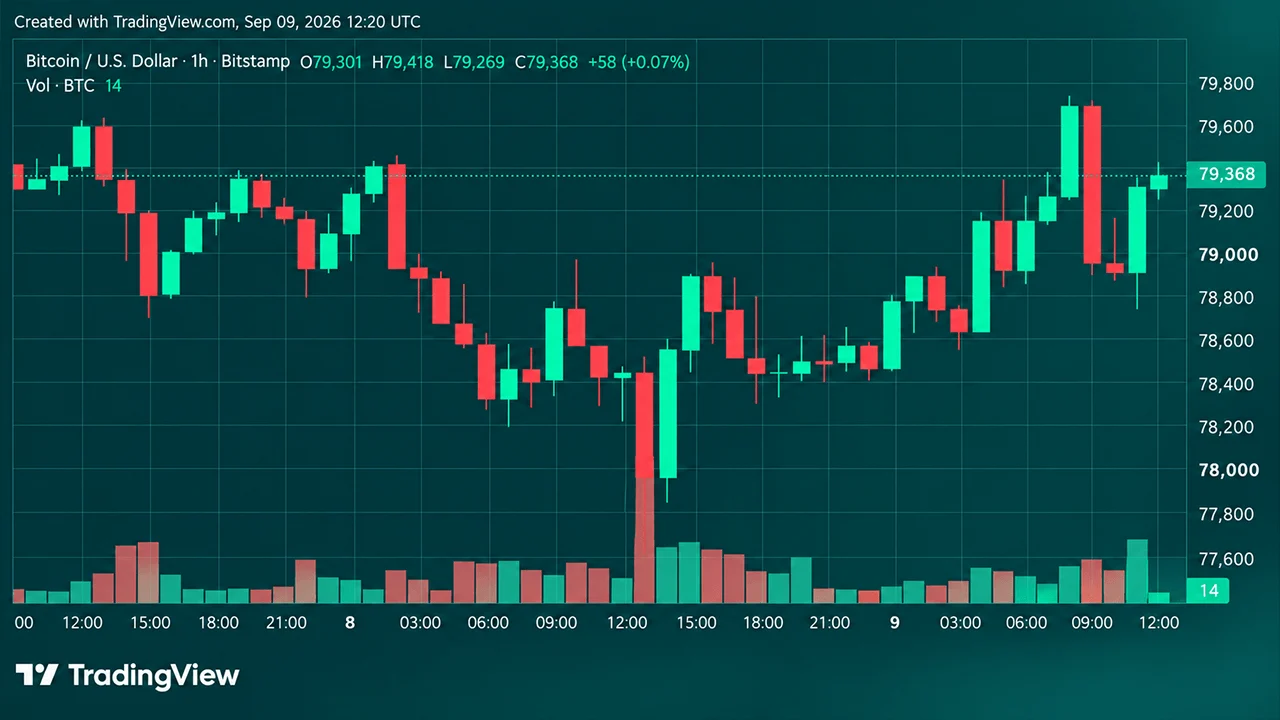
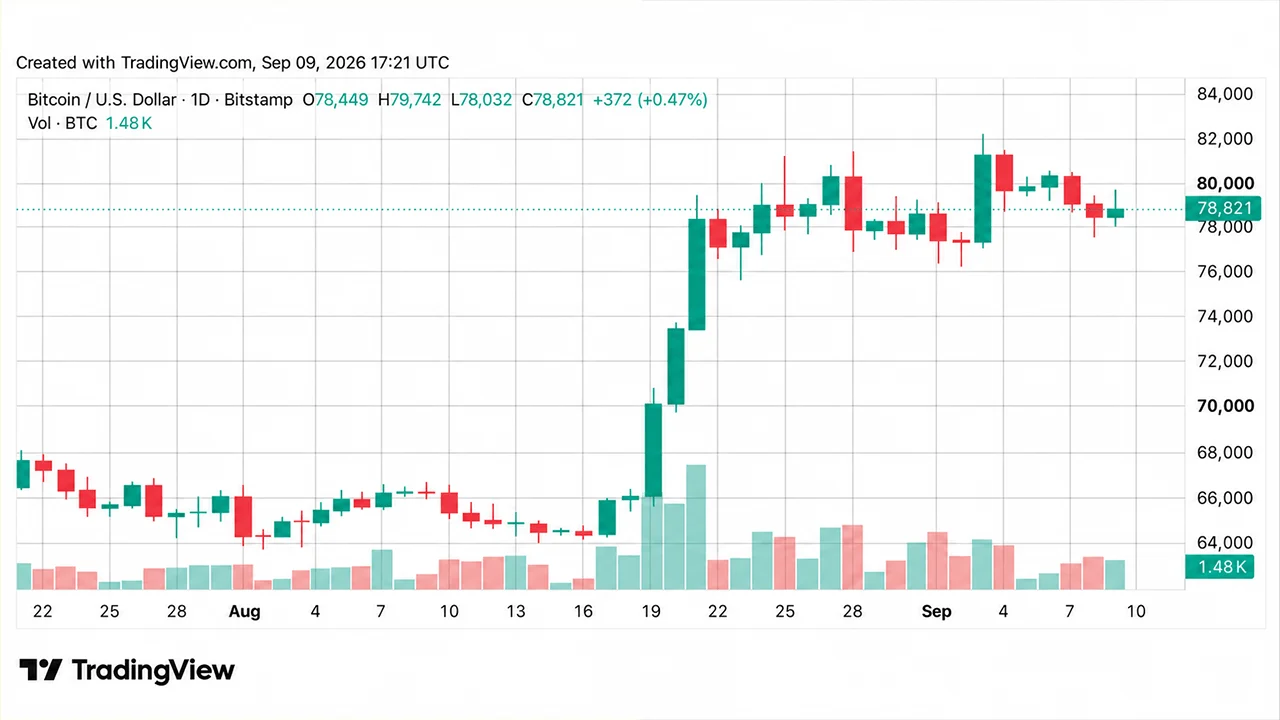
The bitcoin price fell about $1,765 in 20 minutes to $83,577, liquidating over $400M in longs three days before the Oct. 10 crash anniversary.
POL replaced MATIC as Polygon's token in September 2024. Enter an amount, pay by card or bank transfer, and receive POL at an address you control. Check the network at checkout: Polygon or Ethereum. From $20, with the fee and the exact POL shown before you confirm.
Other popular cryptocurrencies to buy
Your address: you give the address before you pay, and the POL is sent there.
No exchange account: nothing to open, and nothing to withdraw afterwards.
Your control: in a self-custody wallet, only you can move the POL once it arrives.
The network: POL is shown with the network it is sent on, Polygon or Ethereum.
The rate and fees: the live POL price, the processing fee and the network fee, up front.
Your POL: the estimated amount that reaches your address. You buy by amount, not by the coin.
Cards: debit or credit card, where your card issuer and your region allow it.
Bank transfer: where it is offered, usually cheaper and slower than a card.
Private card details: a regulated provider handles card payments under PCI-DSS, and Bitcoin.com never sees your card details.
Buy POL by card or bank transfer, no exchange account needed
From $20, with the fee shown before you confirm
POL replaced MATIC: check the network before you pay
Buy POL by card or bank transfer, no exchange account needed
From $20, with the fee shown before you confirm
POL replaced MATIC: check the network before you pay
Buy POL by card or bank transfer, no exchange account needed
From $20, with the fee shown before you confirm
POL replaced MATIC: check the network before you pay
Have a Polygon address ready, choose an amount and a payment method, and check the network before you buy.

1. Get a Polygon address
You need an address on the Polygon network, which starts with 0x. The Bitcoin.com Wallet supports Polygon: copy the receive address of your Polygon wallet. Any other wallet that supports Polygon works too. Check the address again after you paste it into the order.
2. Enter how much POL you want to buy
Choose your currency and enter an amount from $20 in the buy widget. You'll see an estimate of how much POL you'll receive at the current quoted rate. You buy by amount rather than by the coin, so you don't need to buy a whole POL.
3. Choose your payment method
Pick from the options available to you, such as a debit card, a credit card or a bank transfer. Card is usually the faster option; bank transfer usually costs less and takes longer. What you see depends on your country and on the payment provider shown at checkout.
4. Sign in, verify and check the network
5. Receive your POL
Polygon renamed its token in 2024. Four things that matter when you buy it.
In September 2024, POL replaced MATIC as Polygon's token, one for one. Anywhere that sells Polygon now sells POL, and no new MATIC is issued.
MATIC held on the Polygon network became POL automatically, and most exchanges converted their customers' balances for them.
POL exists on two networks. Four things to check before you pay, and again whenever you move it.
Native POL on Polygon PoS is the coin that pays Polygon's fees. POL on Ethereum is an ERC-20 token. Same name and ticker, different networks.
The payment provider shows POL with its network before you pay. Choose Polygon if you'll use POL on Polygon or send it to a Polygon wallet.

POL is the token of the Polygon network. It pays the fees on Polygon PoS and is staked to secure the network.
POL moves natively on Polygon PoS and as an ERC-20 token on Ethereum. A wallet shows only the POL on the network it is set to, so check which one you're buying before you pay.

It depends on the live rate. You buy by amount rather than by whole coins, and the quote shows the exact POL you'll receive before you confirm. The price is volatile and can fall as well as rise, so only buy what you can afford to lose.
Four separate costs, and buying here to your own address avoids the last one.
Set by the payment provider and the method you choose, and shown before you confirm.
Any margin built into the exchange rate. Compare quotes on the POL you receive, and check the market rate on POL to USD.
Your POL lands at the address you gave, on the network you chose. Here is what you can do next.
Keep it in a Polygon wallet you control, with a little POL left over for gas.
Have a Polygon address ready, check the network, and see the exact POL and the fee before you pay.
The purchase is processed by the payment provider shown at checkout. It asks you to sign in and, on your first order, to verify your identity, usually with a government-issued photo ID. Before you pay, check the network shown next to POL: choose POL on Polygon if you'll use it on Polygon or send it to a Polygon wallet. Then paste your address and check the rate, the fee and the POL you'll receive before you confirm.
Once the payment is processed, your POL is sent to your address on the network you chose. Most orders arrive soon after the payment clears, but delivery can take up to two hours. Bank transfers take longer to clear before anything is sent.
MATIC held as an ERC-20 token on Ethereum stays MATIC until you upgrade it, one for one, through the Polygon Portal, which is still open (October 2026).
Look at the network and the token, not the label: some wallets still call the Polygon coin MATIC. MATIC or POL? What changed.
Polygon and Ethereum addresses look the same. POL sent on Ethereum to your Polygon address won't show in your Polygon wallet. In your own wallet it isn't lost, but moving it costs ETH.
On Polygon it is paid in POL and is usually a fraction of a cent. POL on Ethereum needs ETH to move.
Buy on an exchange and you pay to withdraw the POL to your own wallet. Buying here sends it straight to your address.
See the live Polygon (POL) rate, chart and market data.
Work out what your POL is worth in dollars.
Convert POL back to your local currency where supported.
You buy POL. It replaced MATIC one for one in September 2024, so buying MATIC now means buying POL. The steps are the same: a Polygon address, an amount, a payment method and a check of the network at checkout. What changed is set out in MATIC or POL? What changed.
POL is the token of the Polygon network. It replaced MATIC in September 2024, pays the fees on Polygon PoS and is staked to secure the network. The Polygon (POL) price page covers what Polygon is in more depth.
Check the network and the token, not the name your app shows: some wallets still label the Polygon coin MATIC. On the Polygon network it is POL. On Ethereum, look the token up in a block explorer such as Etherscan. More on the change is on the Polygon wallet page.
If it went to a 0x address in your own self-custody wallet, it is still there, on Ethereum. Add the same recovery phrase as an Ethereum wallet to see it (how to recover tokens sent to the wrong network). To move it to Polygon you need ETH for gas and the Polygon Portal bridge. If it went to an exchange that doesn't accept POL on Ethereum, recovery is up to the exchange and may not be possible.
It changes constantly with the market. See the live rate on the POL to USD converter. The buy widget also shows exactly how much POL your amount buys before you confirm.
Yes. Selling works like the purchase in reverse: a payment provider takes the POL and pays out to a card or bank account, subject to the verification and regional limits that apply to you. Start from the sell POL page.
Whether you can buy POL here depends on where you live and on the payment provider processing the purchase, and the same goes for the payment methods and the network you see. Enter an amount in the buy widget and it shows exactly what is available at your location before you pay. You don't need an account at any exchange: this page sends POL to an address you control.
In the US, POL is available here in all 50 states, except POL on the Polygon network in New York, and it is also listed on the major US exchanges and on several brokerage apps. Check the network shown next to POL before you pay. If you go through a brokerage app, check whether it lets you withdraw POL to your own address. Some only hold a position for you.
In Australia, Canada and New Zealand, where many people still search for MATIC, a debit or credit card is the usual route. Enter an amount and the widget tells you whether POL and your preferred payment method are available before you go any further.
Wherever you buy, the same check applies at checkout: the network shown next to POL decides where it arrives, so make sure it matches the wallet you're sending it to.
There are five common ways to get POL. They differ in who holds it afterwards, which network it arrives on, and what you have to set up first.
| Route | Account needed | Where the POL ends up | What to watch |
|---|---|---|---|
| Card or bank purchase to your own address (this page) | None beyond the provider's ID check | An address you control, on the network chosen at checkout | Processing fee and rate spread, shown before you confirm |
| Centralized exchange | Exchange account with full verification | The exchange's custody until you withdraw | The withdrawal fee, and which network the withdrawal goes out on |
| Brokerage or trading app | Brokerage account | Usually the platform's custody | Whether you can withdraw POL at all |
| Buying inside a self-custody wallet | The partner provider's ID check | Your wallet | The partner's fees, and the network it sends on |
| Swapping crypto you already hold on Polygon | None | Your wallet, on Polygon | The swap rate, and the gas, which you need some POL to pay |
Buying here, or through a wallet's partner provider, puts POL at an address you control from the start. An exchange keeps it in your exchange account until you withdraw it, and a brokerage app may not let you withdraw it at all. If you already hold USDC or another token on Polygon, swapping it for POL avoids a card or bank payment, but the swap itself costs gas in POL, so you need a little POL first.
Whichever route you take, check what you're getting. Native POL on Polygon PoS is the coin that pays Polygon's fees, and POL on Ethereum is the same token as an ERC-20. Where a service still says MATIC, check whether it means the old token or is just using the old name.
The checkout shows POL with the network it will be sent on, and that choice decides where you can use the POL once it arrives.
Choose Polygon if you'll pay with POL, use apps on Polygon, hold USDC or USDT there, or keep POL in a Polygon wallet. Fees on Polygon are paid in POL and are usually a fraction of a cent.
Choose Ethereum only if you'll hold POL on Ethereum or deposit it with a service that takes POL on Ethereum. Moving POL on Ethereum costs ETH, so you need some ETH in the same wallet too.
Moving between them means bridging through the Polygon Portal, which takes time and costs fees on both networks. Getting the network right at checkout is cheaper than fixing it afterwards.
Sending to an exchange? Use the network its deposit screen names for POL. Some exchanges no longer accept the Ethereum version of MATIC, and POL sent on a network an exchange doesn't support can be lost. Holding POL on Polygon is covered on the Polygon wallet page.
The address has to come from a wallet that supports the Polygon network and lets you back up a recovery phrase. The Bitcoin.com Wallet supports Polygon (see its supported networks), and many wallets built for Ethereum-style networks do too, although some need Polygon added as a network first.
A Polygon address starts with 0x and looks exactly like an Ethereum address, which is why the network check at checkout matters. In your wallet, open the Polygon account, choose Receive and copy the address.
Write the recovery phrase down and keep it offline: whoever has it controls the POL. Never use an address sent to you in a direct message or by someone claiming to be support. Nobody legitimate needs you to send POL to an address they choose. What to look for in a wallet is covered on the Polygon wallet page.
Card purchases are usually the faster option. You enter an amount, pick your card, and the POL is sent to your address once the payment clears. Debit and credit cards are the widely available options, and bank transfer is offered in some countries. Bank transfer usually costs less than a card and takes longer to settle. See MoonPay's payment methods by country; the widget shows what you can use before you confirm.
Before paying by credit card, check one thing: some issuers treat cryptocurrency purchases as a cash advance rather than an ordinary purchase, which can mean a higher interest rate with no grace period plus a cash-advance fee, on top of the purchase fee. That is your card issuer's decision, not Bitcoin.com's. Debit-card purchases generally don't carry cash-advance interest, although bank, issuer or provider fees may still apply. How payment methods compare across crypto generally is set out on our page dedicated to buying crypto.
The methods you can use are the ones the payment provider lists at checkout for your country. Don't assume a payment app you use elsewhere will be one of them: check the list before you start.
The minimum purchase is generally $20 and can vary by asset and network, and you don't need to buy a whole POL. The clearest way to compare routes is how much POL you end up with for the amount you paid, and the quote shows that figure before you confirm.
Not here. A regulated provider converting money into crypto has to verify who you are before it processes the purchase. It usually asks for a government-issued photo ID, sometimes with a selfie or proof of address, depending on the provider, the amount and where you live. The provider sets the requirements, not Bitcoin.com, and it tells you what it needs while you are buying.
The check covers the fiat purchase, not what you do with POL afterwards. Once POL is at an address you control, you hold it directly. Swapping crypto you already hold for POL involves no card or bank payment.
This page can't tell you whether to buy POL, and anyone quoting you a future price is guessing, including the predictions that turn up in search results. What it can do is set out what you would be buying.
POL's price is volatile and has fallen a long way from its highs. The live chart and market data are on the Polygon (POL) price page.
New POL is issued every year to reward the validators who secure the network and to fund a community treasury, which adds to the supply. Polygon has also changed its strategy and its products several times since it began as Matic Network in 2017.
POL is a network token, not a share in Polygon Labs or any other company. Its price can fall as well as rise, so buy only what you can afford to lose.
Turning POL back into your local currency is the purchase run backwards: a provider takes the POL and pays out to a card or bank account, within the verification rules and regional limits that apply to you. The sell POL page starts that. Swapping POL for another cryptocurrency stays on-chain and doesn't produce cash.
To see what a holding is worth before you decide, POL to USD does the arithmetic. Before you sell, check which network your POL is on, because the provider asks for it on a specific network.